


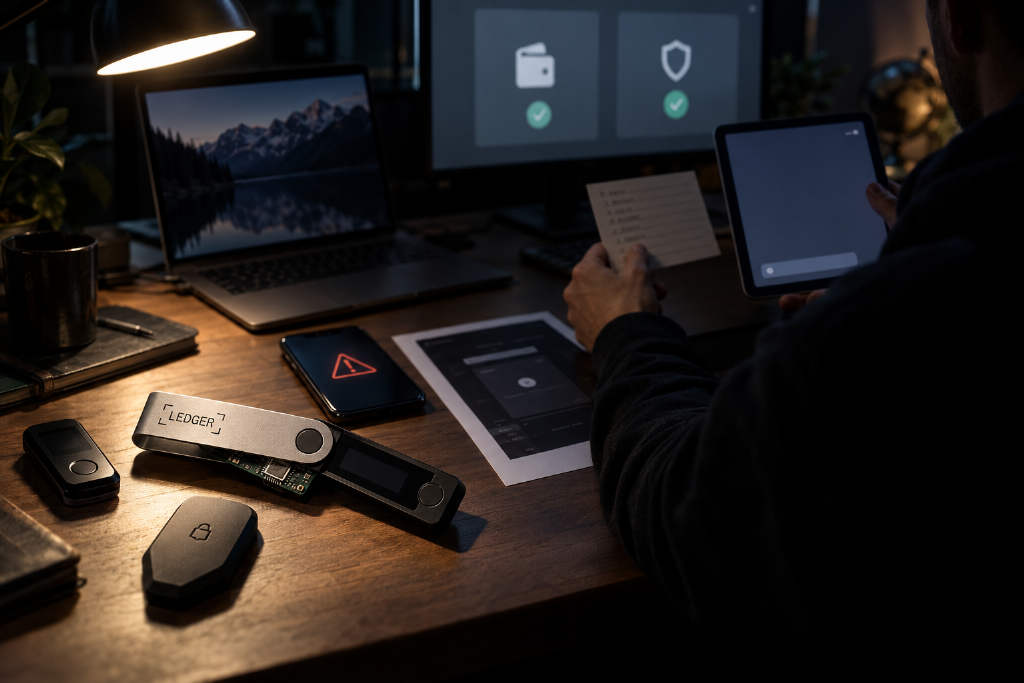
PANews has published a market analysis by Lightning HSL on how users should safeguard their own tokens in the AI era. The article opens with renewed concern around hardware wallets, pointing to claims that some Ledger devices sold by distributors had been tampered with through implanted chips that could steal funds. Citing posts on X rather than any official Ledger statement, the author says a circuit board was allegedly hidden beneath the Ledger screen to capture and send out a seed phrase while the user was writing it down. The piece adds that the reported losses have exceeded 90 million USDT and involved more than 300 wallets.
The author says he had once argued in an earlier article that using a dedicated iPhone with a wallet app was better than relying on a hardware wallet. At the time, he believed one dedicated device was secure enough. That judgment has now changed. In his view, AI has sharply improved the toolkit available to attackers: phishing pages look more real, fake support staff sound more convincing, scams can be customized at scale, and 0day vulnerabilities that ordinary users do not understand can become more dangerous once AI amplifies them.
The article’s core argument is that AI raises risk, but it can also be used on the defensive side. It then lays out five suggestions.
Use multisig and split keys across separate devices
The first recommendation walks back the old idea that one device is enough. The author now argues that users should rely on multiple devices and a multisig setup because the risk of a single point of failure remains too high, even if a device is normally powered off and used only when needed.
For coins that need to be moved often, the article recommends multisig and says a 2-of-3 setup should be the minimum. The logic is simple: buy one more device, manage more than one private key, and security gains another layer.
For Ethereum and other EVM chains, the piece points to safe.global. The example given is one iPhone with a wallet app holding the first key, one Mac with Chrome and a browser wallet extension holding the second, and a third key generated on the iPhone, backed up, and then deleted from the device. Under that arrangement, the article says, an attacker would need both the iPhone and the Mac to fail at the same time.
The advice is different for Bitcoin. The author says BTC that rarely moves, does not interact with websites, and is not used for DeFi may not require a multi-device multisig structure. For that kind of long-term holding, he says a Bitcoin Core node wallet on a dedicated MacBook, plus a 2 TB hard drive to download blockchain data, can push risk very low because Bitcoin is comparatively simple and exposes fewer attack surfaces.
The article also notes that Bitcoin does have multisig wallets, but the author says he does not feel those products have enough brand familiarity, while Bitcoin script-based native multisig carries a technical barrier high enough that users could mishandle funds and turn them into miner fees. One point is repeated throughout the section: custody devices should be used only for custody. Do not manage crypto on a daily-use phone or laptop, and especially do not install AI on those devices.
Ask AI to design a custody plan and then attack it
The second section turns to using AI to help produce a custody framework. The article says investment is personal, and token custody is personal as well. In the past, the author spent significant effort writing self-custody plans. With AI, he says, that kind of planning can now be generated through direct conversation.
His suggestion is to explain one’s own situation clearly to AI: how assets are layered, which holdings are used often and which will not move for years, how often transfers happen, which chains are involved, how much operational complexity is acceptable, and how family members would take over if something happened to the owner.
After AI proposes a plan, the user can switch roles and ask it to act like someone trying to steal the funds, identify the weakest point, revise the setup, and repeat the process several times.
At the same time, the article issues a hard warning. The computer or phone used for token custody should not have AI installed. The author argues that people tend to trust AI too much and may hand full control of a machine over to it, which makes AI on a wallet device a serious risk in his view.
The article also addresses whether it is safe to let AI know that you hold crypto. The author says this is safer than letting a distributor know when you buy a hardware wallet. A distributor knows your name, phone number, address, and has handled the device on which your private keys were first generated. In that comparison, the author considers sharing custody requirements with AI the less risky option.
Still, he adds that the strongest security would be for nobody to know you hold tokens at all. In practice, he says, that is no longer realistic: exchanges know, device sellers know, and on-chain addresses are visible to anyone. The real choice is who knows and how much they know. On that basis, he writes that trusting AI is better than trusting a specific individual.
Use AI to verify domains and app sources
The third section focuses on checking websites and app origins. The article says crypto users, especially those active in DeFi, cannot avoid visiting many websites.
The author says his old rule was to verify any domain name through three different information sources before trusting it. Common checks included official sites such as ethereum.org or bitcoin.org, whether the project was listed by CMC, a Google search, a search on x.com, and asking a genuinely trusted friend.
Now he adds AI to that process. The piece says AI is particularly good at domain checks. Free tools such as Gemini, ChatGPT, Grok, and Doubao can each be asked once, and their responses can be used as an important part of the verification process. If possible, he says, paid versions are better, with reasoning settings pushed as high as possible.
The same method is recommended for wallet apps. Before downloading a wallet app, the article suggests sending a screenshot of the App Store page to AI for review. Chrome extension wallets should go through the same check. The prompt can be as direct as asking whether the app or site is legitimate.
The author says he now asks AI that question every time he clicks on a new domain or downloads a new app.
Send signing screens to AI before approving a transaction
The fourth point is presented as the article’s most important practical suggestion. Before signing, let AI read the signing screen.
According to the piece, for most common actions such as token transfers, approvals, and interactions with mainstream contracts, MetaMask already shows the meaning of a transaction in the signing interface. If users read it carefully before confirming, they can usually understand what will happen to the wallet. Fields such as to, value, data, and nonce are now explained far better than they were a few years ago.
The author recalls that older wallet interfaces often showed little more than strings of 00, fff, and 1234, making them difficult to interpret directly. At the time, he says, he frequently used sites such as 4byte.directory to paste transaction data and inspect what a signature would actually do.
Now, he argues, AI can teach users how to read those signing requests. His suggestion is to photograph or screenshot the wallet popup before signing and let AI interpret it. The article says that screen does not contain a private key or seed phrase, and the contents become public across the network once the transaction is confirmed anyway. AI’s explanation, he says, can tell the user what will happen after signing and help identify phishing.
The article also sets limits around this practice. The author recommends using a test wallet first and letting AI explain each step of wallet interaction end to end, so the user learns how to read those flows. He does not suggest feeding every production screenshot to AI from the start. In real-world use, the phone or computer that holds the wallet still should not have AI installed. If AI must be used to interpret signing content, he says, use photos or screenshots instead.
The piece singles out Safe wallet flows as another case where this can help. Safe provides its own explanation of many transactions, but by the time the flow reaches MetaMask, the transaction details may become less clear. If the user is worried, the article says, those strings of 00 and fff can be given to AI for interpretation to reveal what signing will actually do.
It then adds a more pointed warning: when using Safe, Safe’s own explanation page is not the final authority. The explanation attached to the transaction fields in the MetaMask popup is the final reference point. The author says the Bybit theft involved a tampered Safe explanation page, so users should rely on MetaMask’s transaction-field explanation instead.
Let AI watch security warnings for you
The fifth recommendation is to have AI monitor security alerts. The article says users can ask AI to watch hardware, software, contracts, and platforms they care about for vulnerability reports and security notices.
As an example, the author says Grok bot can monitor x.com. Users can give it a list of X accounts such as MetaMask, SlowMist, and Lido, and ask it to watch for security-related posts and send an email alert if one appears.
Even then, the article says any warning should still be verified through official channels. Users should not click links in emails or posts, because that opens the door to phishing again. The author adds that another AI can also be assigned to help verify the alert.
Before making a major financial transfer, he suggests checking the inbox that receives those security reminders.
The closing view
The article ends with the author’s belief that AI will ultimately be a force for good and will make the online environment safer.