

OpenAI officially brought ChatGPT into Microsoft Word on Sept. 17, adding a chat sidebar that lets users edit text in place after installing the company’s official plugin from Microsoft Marketplace.
Inside Word, users can select a passage and issue instructions directly in the sidebar. The revised text is inserted back into the document in the same place, while fonts and numbering stay intact.
The rollout is broad. According to the article, Free, Go, Plus, Pro, Business, Enterprise, and education-focused accounts are all included in the plan, and the feature is being opened globally. That means users do not need to pay to access ChatGPT inside Word.
The plugin works on the document currently open in Word
The release comes as an official plugin that users need to install themselves through Microsoft Marketplace. Once installed, it reads the document currently open and can handle a range of writing and editing tasks inside that file.
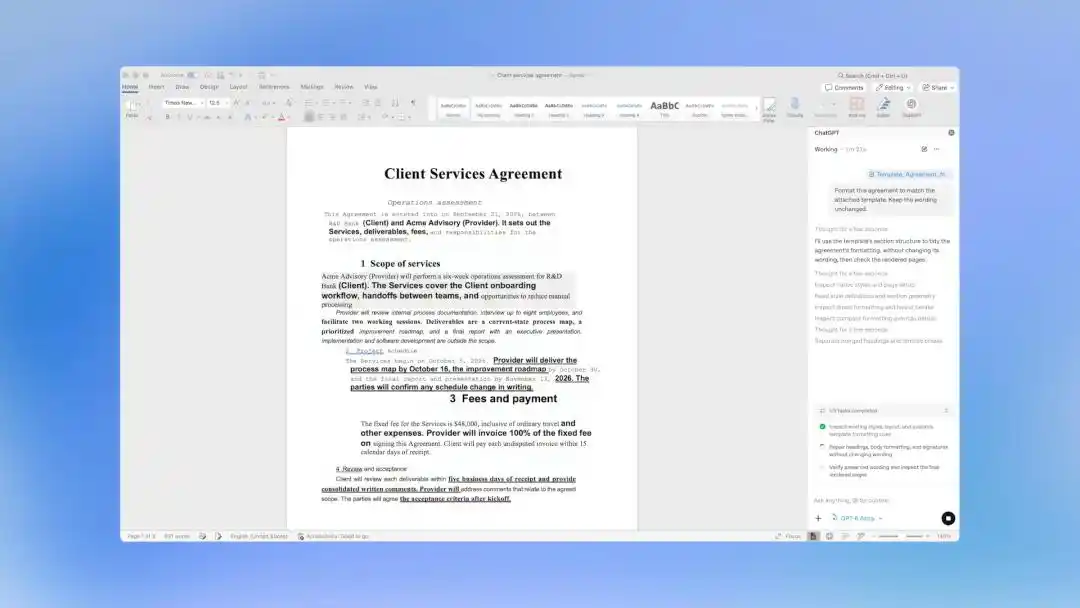
The article lists several examples:
- turning scattered notes into a structured first draft;
- reading a long report and extracting conclusions and key risks into a summary;
- compressing a section for a specific audience while keeping facts and defined terms unchanged;
- repairing messy heading levels and broken numbering;
- standardizing terminology across a document, such as aligning different labels like “user,” “client,” and “consumer.”
The article also says the tool can be used in education settings. Students can use it to review papers, unify terminology, and smooth out chapter structure. Teachers can use it to revise lesson plans and condense lecture materials. For contracts, users can highlight a clause, ask for a plain-language rewrite, and request a list of questions to raise with legal staff.
Tracked changes and comments are built into the workflow
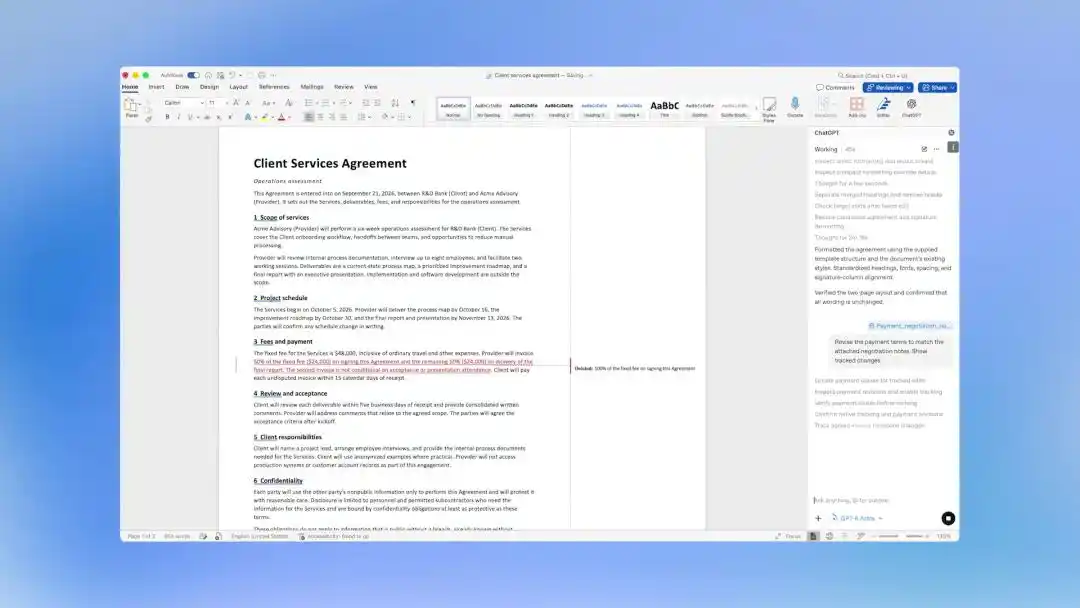
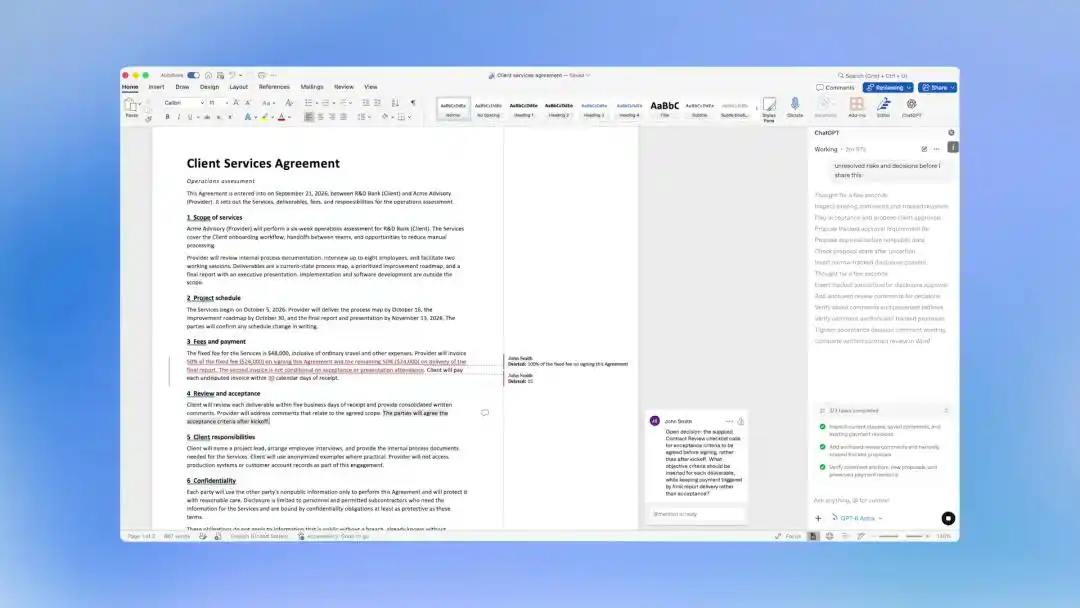
In the official demo cited by the article, a prompt such as “revise the payment terms based on the attached negotiation record and turn on track changes” does not overwrite the original text. Instead, edits appear as tracked changes: deletions are marked with strikethroughs, additions are highlighted, and the user can accept or reject each change one by one.
The plugin can also attach comments next to paragraphs to flag unresolved issues. One example in the article asks whether acceptance criteria should be agreed before signing or left until after the kickoff meeting, as the current draft suggests.
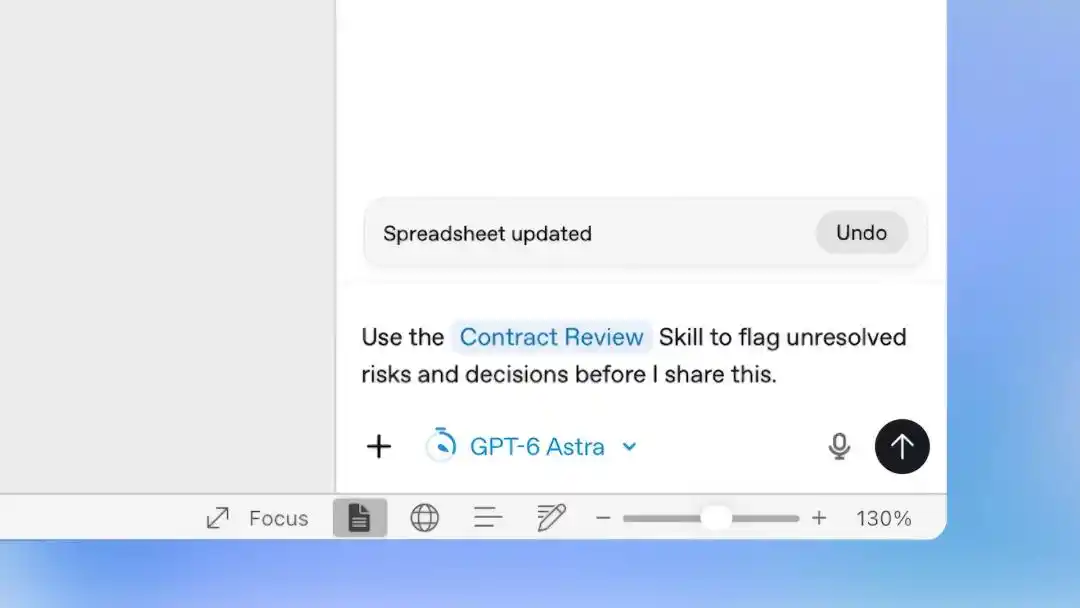
For recurring work, paid and enterprise accounts can save repeatable workflows as Skills. The example shown in the article uses a “contract review” skill to mark unresolved risks and pending items before a document is sent out. That setup is meant to reduce the need to restate instructions every time for weekly memos or fixed-format contract reviews.
Free access comes with three trade-offs
The article says users should keep three limits in mind.
First, free users get access to the entry point, not the strongest model. Free and Go plans can install the plugin, but they default to GPT-5.6 Luna, described in the article as the fastest and lowest-cost tier. They cannot use GPT-5.6 Sol, and even the deeper reasoning option still runs on Luna.
Second, the real quota-free benefit is reserved for enterprise customers. From Sept. 17 to Sept. 30, Business and Enterprise users can preview GPT-5.6 Sol in Word without consuming their normal quota. The article frames this as a clear commercial path for OpenAI: lower the barrier to zero for broad adoption, then place the more expensive model in front of corporate buyers.
Third, writing reports and writing code now draw from the same pool. Word usage is billed by token according to the API pricing of the model being used, and longer documents with more back-and-forth consume more. More importantly, the article says this usage shares the same quota as advanced features such as Codex. OpenAI’s help documentation states that using ChatGPT in Word reduces the quota available to those tools.
OpenAI’s help documentation flags three cautions
OpenAI’s help materials, as cited in the article, say complex formatting, tables, and charts still need manual adjustment.
The article highlights three specific warnings:
- the system can make mistakes, so important facts and numbers need to be checked manually before anything is sent, and users should save a copy before major edits;
- it only sees the document currently open, not other files on the computer, so any outside reference material must be pasted into the chat manually;
- chat history inside the plugin is separate from the web version of ChatGPT, so memory and usage habits do not carry over.
The article compares the plugin to a very fast new colleague: quick at the task, but unfamiliar with the user and not responsible for the final outcome.
OpenAI has now filled out the Office trio
The Word launch did not come out of nowhere. The timeline in the article says ChatGPT arrived in Excel in May, in PowerPoint in July, and in Word in September. In a little over four months, OpenAI completed the three core Office apps. All three use the same plugin, so one installation works across the suite.
Another date matters here: Oct. 1, 2026. Starting then, ChatGPT for Word will be enabled by default in workspaces. The article says that within two weeks, the tool will become a standard part of Word in many companies, removing the need for employees to decide whether to install AI tools at all.

Three AI systems now sit inside the same Word window
The article notes that Anthropic moved earlier on timing. Claude for Excel and PowerPoint launched in February this year, and Claude for Word entered public beta in April, putting Anthropic about five months ahead of OpenAI in completing the trio. Its pitch is more focused on professional workflows: every change lands as native Word tracked edits, users can review them one by one as if they were checking a colleague’s draft, and comment threads can show what changed and why. The trade-off is that Claude is only available on paid plans, with no free tier.
Microsoft’s own Copilot has also remained in place throughout. The article says Copilot has long occupied this home field, with a feature set that overlaps heavily and with access to an organization’s permission system and data.
As the article lays it out, Word now hosts three AI offerings at once:
- Microsoft Copilot, focused on native integration and compliance, backed by organizational permissions and data;
- Anthropic’s Claude for Word, focused on depth and control, with edits shown as native Word tracked changes and reviewed one by one;
- OpenAI’s ChatGPT for Word, focused on breadth and a zero-barrier entry point that includes free users.
The article argues that it is unusual in office software history to see one company’s product host models from two other companies while those same firms are also major partners and rivals.
OpenAI is also trying to remove copy-and-paste from the desktop layer
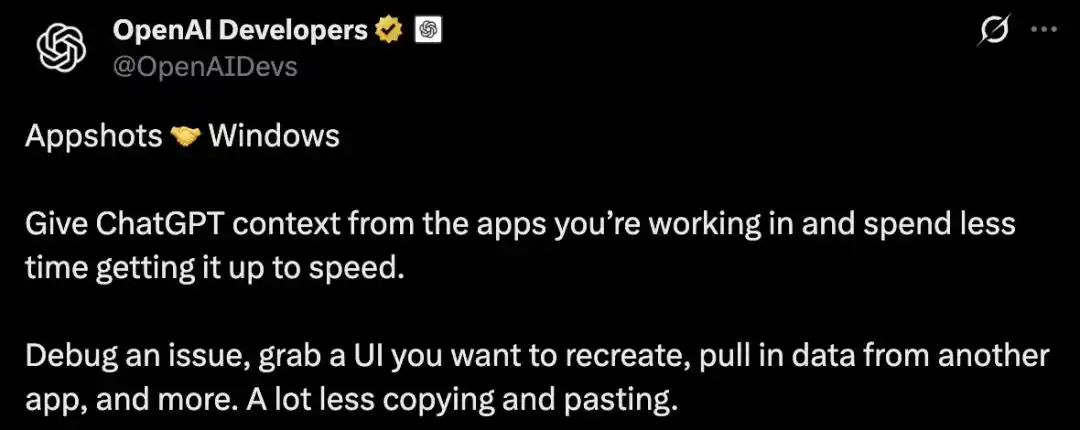
The report closes by saying OpenAI is not only targeting Word. A few days before the Word launch, the Windows desktop version of ChatGPT added a feature called Appshots. By pressing the two Alt keys at the same time, users can send both a screenshot of the current window and the text inside it to ChatGPT, including content that has not yet been scrolled into view.
The article presents these as two routes aimed at the same problem: one works from inside Office, the other from outside at the desktop level, and both are designed to reduce copy-and-paste. In the past, users often had to decide whether a small editing task was worth switching windows for. With AI sitting next to the cursor, that decision starts to look more like a default action than a separate step.
Reference materials cited in the article include posts from ChatGPT and OpenAI Developers on X. The original piece was published via the WeChat account “Xinzhiyuan,” edited by Yuanyu.