
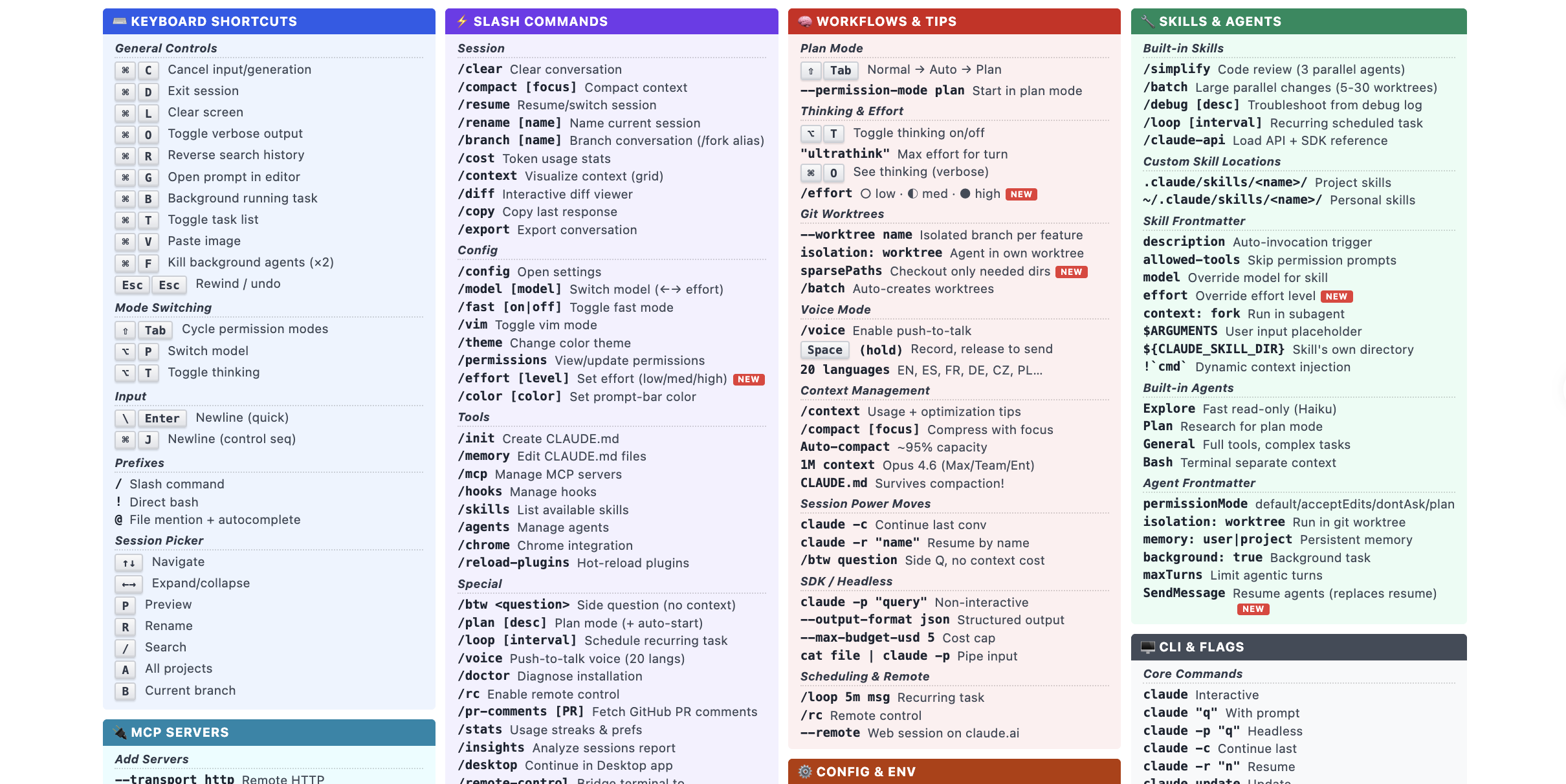
The community-maintained Claude Code Cheat Sheet has been updated to v2.1.81 and published on cc.storyfox.cz. The reference brings together Claude Code shortcuts, slash commands, MCP integration, skills, agents, CLI flags and memory features in a single document aimed at users who want more control over the tool.
Shortcuts and input patterns cover common actions
The sheet lists more than a dozen keyboard shortcuts, including Ctrl+L to clear the screen, Ctrl+O to toggle verbose output, Ctrl+B to run tasks in the background, Ctrl+T to inspect background jobs, Ctrl+V to paste images directly into chat, and pressing Ctrl+F twice to force-stop a background agent. It also maps Shift+Tab to permission mode switching, while Alt+P and Alt+T handle model switching and thinking mode.
Input symbols are also part of the workflow. A line starting with ! runs a bash command, @ references a file, and / calls a slash command. The sheet presents these as core entry points rather than niche features.
Slash commands span context control, models and development tasks
The guide groups slash commands by use case. Context tools include /compact [focus], /context, /resume and /branch, which it notes was previously called /fork. Model controls include /model, /fast and /effort [level].
For development work, the reference highlights /diff, /plan and /pr-comments. It also lists less common commands such as /btw <question> for side questions, /loop [interval] for scheduled tasks, /voice with support for 20 languages, and /remote-control for bridging a local terminal to claude.ai/code.
MCP, skills and agents expand automation options
On integrations, the cheat sheet describes MCP, or Model Context Protocol, as an open Anthropic standard that lets Claude Code connect to external tools, databases and APIs. It lists HTTP, stdio and SSE as the three transport methods, with configuration scopes covering local files such as ~/.claude.json, project-level .mcp.json and user-wide settings.
Skills are presented as a macro-style system for packaging multi-step workflows. Built-in skills include /simplify, /batch and /debug. According to the sheet, /simplify launches three parallel agents for code review, while /batch can run changes across 5 to 30 Git worktrees. Custom skills can be stored at either the project or personal level and configured through Frontmatter fields.
Agents are described as more autonomous execution units. The guide lists four built-in types: Explore, Plan, General and Bash. Their settings include permission boundaries, worktree isolation, memory scope, background execution and maximum turn limits. It also mentions a newer SendMessage function that can resume stopped agents so work can continue after interruption.
CLI flags and memory layers support structured usage
For command-line use, the sheet highlights flags such as claude -p "query", claude -c, claude -r "name", --output-format json, --max-budget-usd 5, --bare and --channels. It also includes pipeline input via cat file | claude -p, which makes the tool easier to place inside scripts and CI/CD flows.
The memory model is split into project-level ./CLAUDE.md, personal ~/.claude/CLAUDE.md, organization-wide /etc/claude-code/ and automatically accumulated project memory under ~/.claude/projects/<proj>/memory/. One detail highlighted by the sheet is that settings stored in CLAUDE.md persist through /compact. The document is not an official Anthropic publication; it is maintained by community developers and, according to the source article, is updated almost weekly.