



Security research team Socket said attackers have listed at least 40 high-risk malicious extensions in Mozilla Firefox’s official add-on store, disguising them as mainstream Web3 wallets such as OKX, Rabby Wallet, and TronLink. Their goal was to trick users into entering seed phrases and private keys, then take over wallets and steal assets in the background.
In an investigation published on Aug. 20, 2026, Socket said the operation went beyond those 40 extensions. The report linked another 37 shell add-ons, presented as sports score tools and other harmless utilities, bringing the campaign to 77 related repositories and release branches. Socket said the activity has been active since March 2026 and remains ongoing.
How the operation was built
Socket named the campaign the Offside wallet theft factory. It described a chain in which attackers mass-built or modified browser extensions, submitted them to the Firefox store, and then used remote phishing pages or built-in theft logic to capture seed phrases and private keys after installation.
Some of the extensions first appeared as sports score tools and were later turned into wallet-stealing programs while keeping the same Firefox extension ID.
Socket outlined three core methods behind the campaign.
One code base, many fake brands
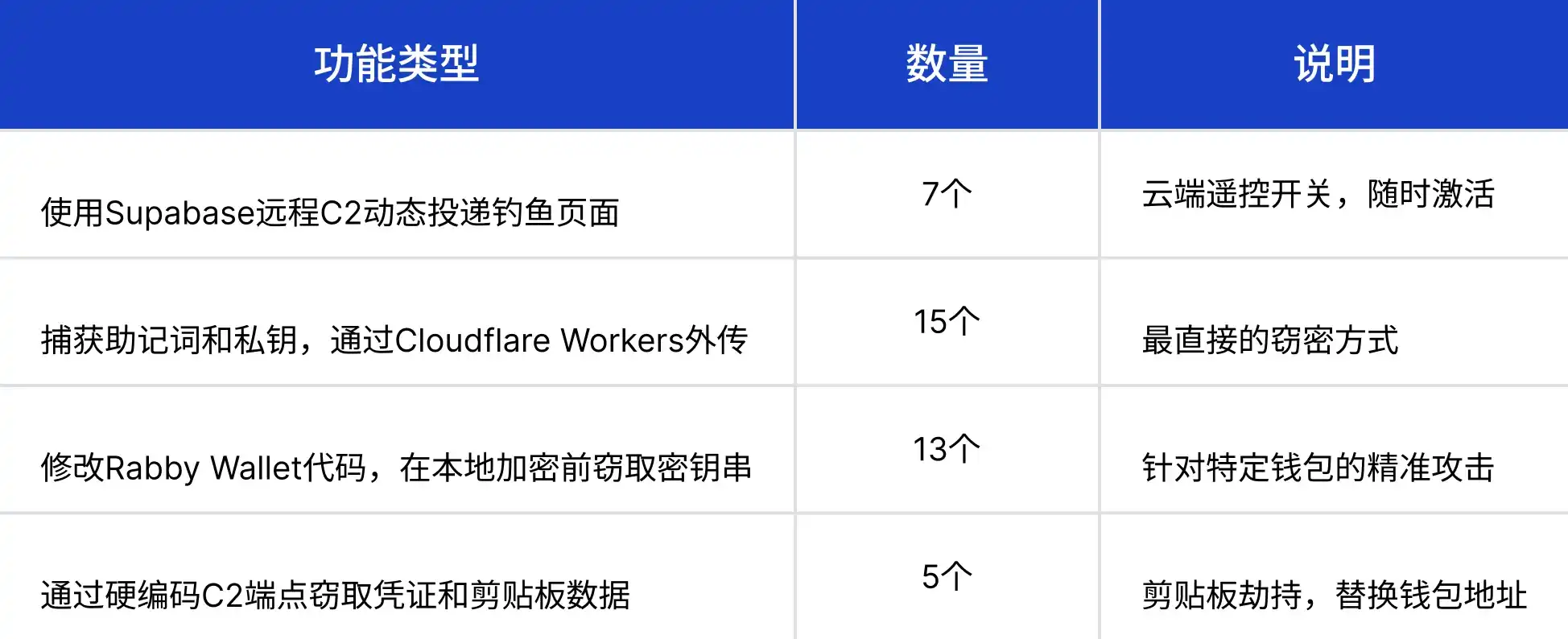
The 40 malicious extensions shared a common theft template. That let the attackers maintain one malicious core while generating dozens of fake products with different names, icons, and decoy pages. The branding changed; the private-key theft logic did not.
Supabase used as a remote switch
Socket said the attackers used a legitimate Supabase cloud database project as a remote C2, or command-and-control, switch. At the time the extensions were submitted to the official Firefox store, they were kept in a silent state without visible malicious code, which helped them pass review. After approval and installation, the attackers could remotely activate the malicious behavior and start collecting seed phrases and private keys typed by users.
Thirty-seven shell add-ons kept in reserve
Beyond the 40 extensions used directly for theft, the attackers also prepared 37 shell add-ons disguised as sports score viewers, VPNs, screenshot tools, and similar harmless products. Socket said these were not used to steal data directly. Instead, they worked as reserve backdoors and a release matrix that could be activated when one malicious extension was removed.
Technical analysis by Socket researcher Kirill Boychenko also detailed the feature distribution across the 40 malicious extensions.
Why browser extensions are a major risk for wallet users
The report said browser extensions often have broad context permissions, and users tend to overlook that during installation.
Socket pointed to permissions such as tabs, which can read all open pages; webRequest, which can intercept and modify network traffic; storage, which can read and write local data; and full DOM read and write access across sites.
For crypto users, the browser is where many sensitive actions happen: entering a seed phrase, connecting a wallet, and signing a transaction. In that setting, a malicious extension can:
- Read content entered on websites, including seed phrases, private keys, and passwords
- Intercept and alter webpage content, including overlaying a fake login box on a real wallet page
- Read and change clipboard data, including replacing a copied wallet address with an attacker-controlled address
- Send network requests to transmit stolen data back to attacker-controlled servers in real time
Socket said multi-factor authentication offers little protection once an extension is poisoned or swapped out, because the attacker is not trying to break the account password. The extension is reading the private key itself.
How users can check for malicious extensions
The report laid out a four-step self-check process.
Step 1: Review installed add-ons
In Firefox, type about:addons into the address bar and inspect the list of installed extensions.
Step 2: Check suspicious entries one by one
Socket said users should pay close attention to several warning signs:
- Extensions not installed through an official wallet website should be disabled immediately
- Names that look unusual, including homoglyph tricks that replace Latin letters with similar-looking Cyrillic characters
- Extensions whose stated function does not match the permissions they request, such as a sports score tool asking to read browser data
- Utility extensions requesting high-risk permissions such as tabs, webRequest, and storage
The report listed confirmed malicious extension names including Safe-Themes, Rabbit For Desktop, and Rabb-Walӏet CryptoPortfolio.
Step 3: Remove them and rotate credentials
If a suspicious extension is found, users should disable and uninstall it at once. Anyone who entered a seed phrase or private key in an affected environment should move crypto assets to a new address from a clean device.
Step 4: Check clipboard history
Some malicious extensions hijack the clipboard and replace copied wallet addresses. Before a large transfer, users should verify every character of the recipient address, not just the beginning and ending.
Socket’s prevention advice
The report also offered four practical recommendations.
- Install extensions only through official channels. Do not rely on search engine ads or third-party redirect links. Go through the wallet’s official website entry point to the extension store, or verify that the version was published by the official developer account.
- Use offline hardware wallets such as Ledger and Trezor for larger crypto holdings. Socket said the private key never leaves the device, which prevents direct key theft even if the browser is fully compromised by a malicious extension.
- Review extension permissions regularly. Even trusted extensions should be checked for permission changes, because an update can introduce malicious functionality and users often miss changes in the update log.
- Do not assume that review by an official store guarantees lasting safety. Socket said the 40 malicious Firefox extensions showed that store review can be bypassed. Passing review means no malicious code was detected at the time of listing, not that the extension will remain safe later.
Socket’s findings point to a coordinated extension supply chain rather than an isolated phishing case: 40 malicious Firefox extensions, 77 related repositories, and activity that has continued since March 2026. For ordinary users, cutting unnecessary extensions, sticking to official installation paths, using hardware wallets for larger holdings, and checking installed add-ons on a regular basis remain the clearest steps available.