

Claude Code has added a new feature that can draft feedback reports on a user’s behalf when something goes wrong inside Claude Code itself.
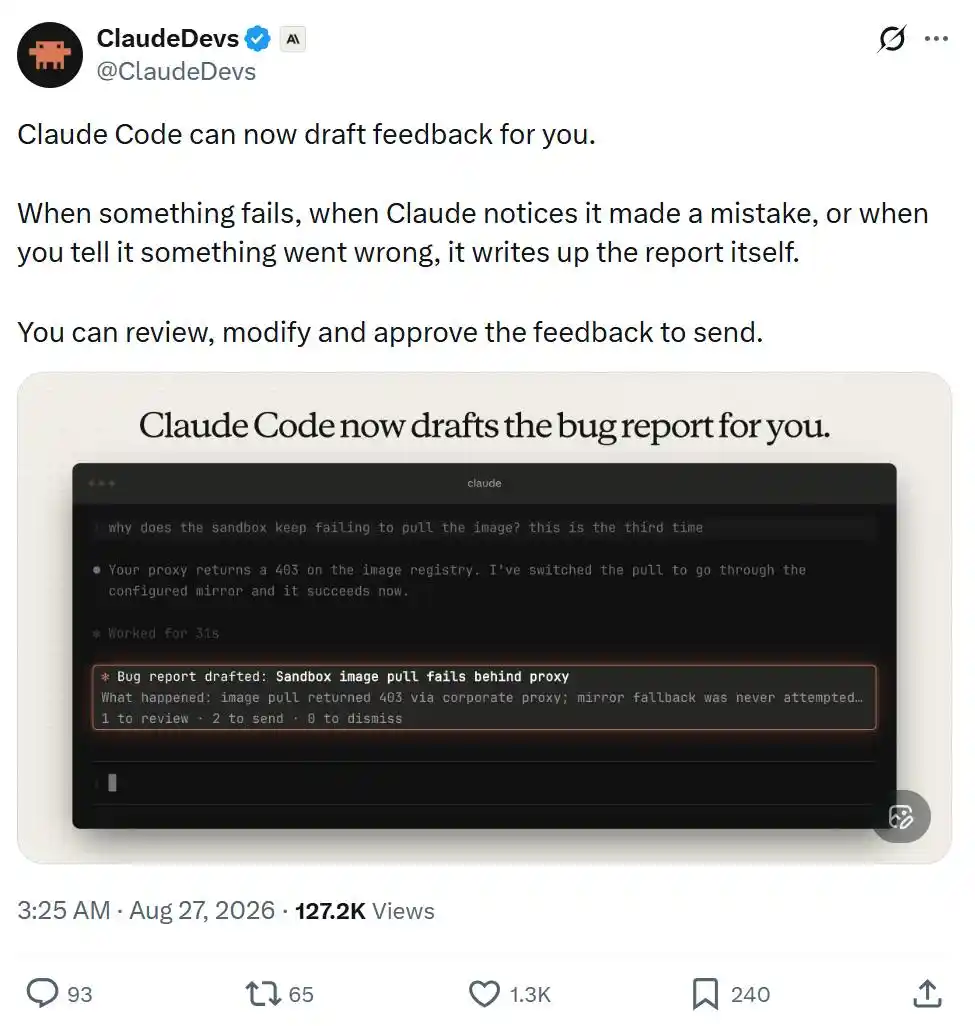
According to the official documentation, the feature requires Claude Code v2.1.238 or later. Each feedback draft is stored locally on the user’s device at ~/.claude/feedback/drafts/, and nothing is sent to Anthropic until the user chooses to submit it.
When Claude Code creates a feedback draft
Claude can automatically prepare a draft through the SendFeedback tool in several cases listed in the documentation:
- a tool or command keeps failing;
- Claude cannot complete a request from the user;
- the user points out that Claude made a mistake, or Claude recognizes the error itself;
- the user asks Claude to submit feedback.
The documentation link provided in the report is: https://code.claude.com/docs/en/tools-reference#sendfeedback-tool-behavior
What users see after a draft is queued
Once Claude adds a feedback draft to the queue, a card appears above the input box showing the draft title. From there, the user can:
- press 1 to view the draft;
- press 2 twice to send it as is;
- press 0 to ignore the card.
Ignoring the card does not remove the draft. It remains in the feedback queue.
After a feedback card is ignored, Claude Code asks whether the user wants to turn off automatic feedback drafting. If the user declines to disable it twice in a row, Claude Code stops asking after that.
By default, a maximum of 3 feedback cards are shown per session. After that limit is reached, or when feedbackDrafts is set to quiet, the interface only shows the number of queued drafts at the bottom of the input box rather than opening individual cards.
Reviewing and editing drafts
Running /feedback without any arguments opens the feedback queue.
The queue lists all unprocessed drafts across sessions, including drafts whose cards were dismissed and drafts whose cards were never seen.
After selecting a draft, the user can review it and take several actions:
- edit the title, category, and body text;
- set Send transcript to yes or no;
- send the draft, delete it, or leave it in the queue for later.
If the conversation tied to a draft still exists when Claude created it, Send transcript defaults to yes. That means the conversation transcript will be submitted to Anthropic together with the feedback. If the user switches it to no, only the feedback report itself is sent.
Users who want to write a report manually can press w to open the standard feedback window. A /feedback command with text, as well as the /bug command, also opens that standard window directly.
What happens after submission
When a draft is sent, Claude Code submits it in the same way as a regular /feedback report and under the same data retention policy. After submission, the draft is deleted from the local device.
If the user sends directly from a feedback card, the interface shows ✓ Sent. If the user sends from the feedback queue, a receipt ID appears when the window closes.
One limitation is spelled out in the documentation: sending directly from a feedback card does not include the conversation transcript.
Claude Code does store working directory information in the local draft so it can find the related conversation record, but that working directory is not sent out.
Deletion, expiration, and queue limits
Deleting a draft removes it from the local device immediately.
If a draft stays in the queue without action, it expires automatically after 30 days.
The feedback queue can hold up to 10 drafts across all sessions. When Claude creates an 11th draft, Claude Code automatically deletes the oldest one.
Where the feature is and is not available
Claude Code only offers automatic feedback drafting in interactive terminal sessions running on the user’s own computer and using the Claude API directly rather than going through a cloud service provider.
The tool is not available in the following cases:
- non-interactive -p mode and Agent SDK sessions, because those environments do not have a review interface for the feedback queue;
- cloud sessions such as Claude Code on the web, because they cannot write feedback drafts to the user’s local device;
- sessions running through Amazon Bedrock, Claude Platform on AWS, Google Cloud Agent Platform, or Microsoft Foundry;
- sessions with any of these settings or configurations: CLAUDE_CODE_SEND_FEEDBACK=0, DISABLE_FEEDBACK_COMMAND=1, any non-empty value for CLAUDE_CODE_DISABLE_NONESSENTIAL_TRAFFIC, feature-flag fetching turned off, organizations with product feedback disabled, and organizations using Zero Data Retention (ZDR).
For organizations with Zero Data Retention enabled, Claude Code does not provide this tool, and /feedback is unavailable as well.
The report says the article originated from the WeChat public account Jiqizhixin and was published by MarsBit.